

Students often search how hackers misuse UPI apps MFA Fatigue Attack Explained: How Attackers Trick Users Into Approving Logins
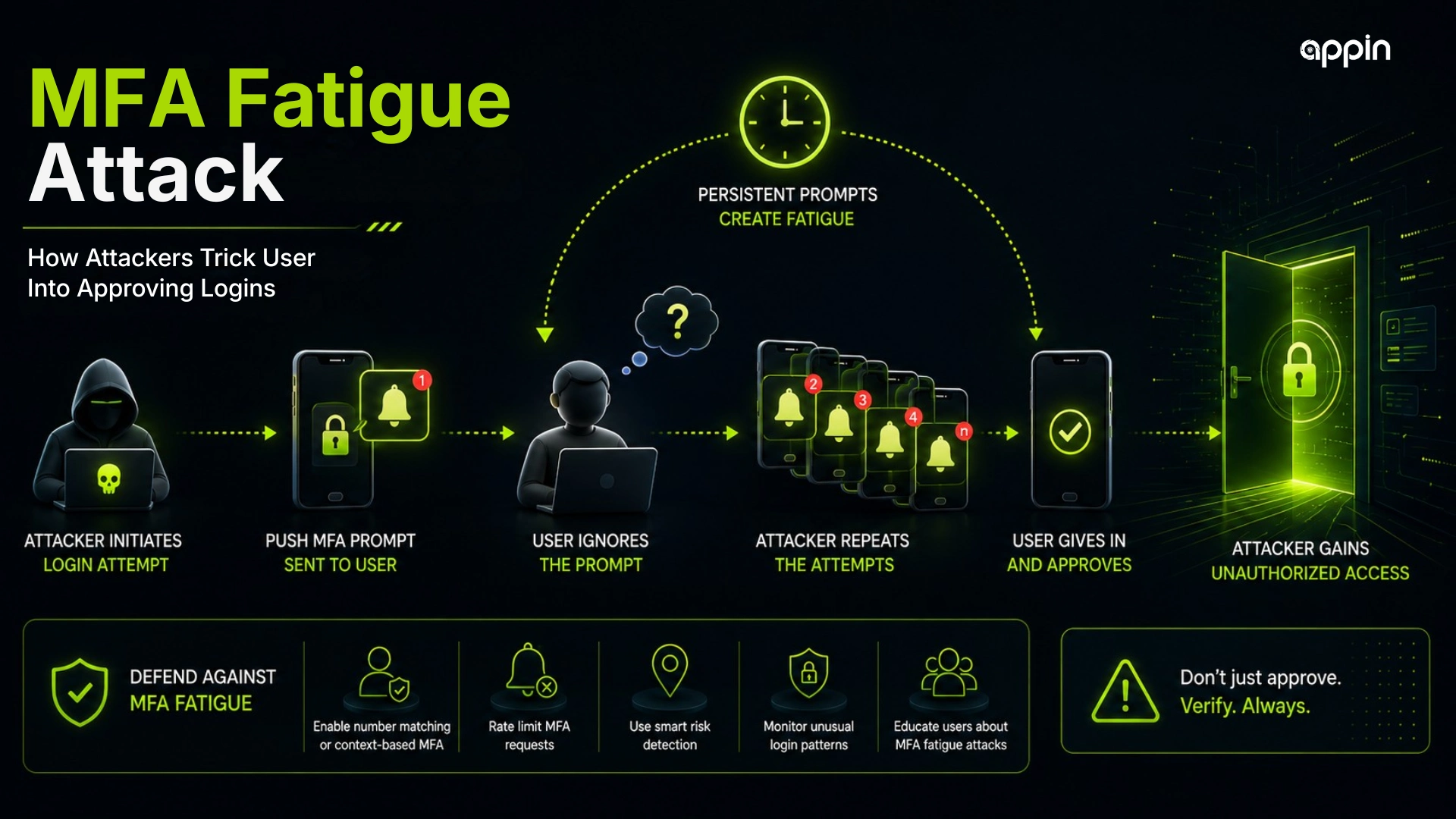
MFA fatigue attack explained simply means attackers repeatedly send login approval prompts until a tired, confused, or distracted user taps approve.
Imagine an employee in Indore receiving login approval notifications on their phone again and again. They did not try to log in, but the prompts keep coming. After many alerts, they may tap approve just to stop the disturbance.
This blog explains how attackers trick users into approving logins, why MFA fatigue is dangerous, and how companies and students can reduce account takeover risk.
What is an MFA fatigue attack?
An MFA fatigue attack is a login attack where cybercriminals repeatedly send MFA approval requests to a user until the user approves one by mistake, confusion, or pressure.
This attack is also called a multi factor authentication fatigue attack or push notification bombing attack. The attacker usually already has the victim’s username and password.
MFA fatigue works because the second factor depends on user approval. If the user approves a fake prompt, the attacker may gain access.
The technology does not fail alone. Human pressure becomes part of the attack.
How does an MFA fatigue attack work?
An MFA fatigue attack works by using stolen credentials to trigger repeated MFA prompts on the victim’s device.
The flow is usually simple:
- The attacker gets the username and password.
- The attacker tries to log in.
- The MFA prompt reaches the real user.
- The attacker repeats the attempt.
- The user approves accidentally or under pressure.
- The attacker gains access.
This is how attackers trick users into approving logins. They make the victim feel tired, confused, or forced to respond.
Why do users approve fake MFA requests?
Users approve fake MFA requests because attackers exploit fatigue, confusion, urgency, distraction, and lack of awareness.
MFA fatigue attack examples may include repeated phone alerts during work, prompts late at night, or a fake helpdesk call saying, “Please approve this to fix your account.”
Users may approve because:
- Notifications keep repeating
- They think it is a system error
- They are busy or tired
- The prompt looks familiar
- A fake IT caller creates pressure
- They fear account lockout
- They do not know how to report it
This is why awareness is important, even when MFA is enabled.
Why are MFA fatigue attacks dangerous?
MFA fatigue attacks are dangerous because they bypass strong authentication by manipulating human behavior instead of breaking the technology.
A multi factor authentication attack can lead to account takeover if the attacker already has the password and the user approves the prompt.
MFA bypass attack explained in this context means the attacker does not crack the MFA system. They trick the real user into approving access.
Account takeover through MFA fatigue can expose:
- Email accounts
- Cloud apps
- VPN access
- HR systems
- CRM tools
- Admin dashboards
- Business files
Once inside, attackers may move toward data theft, payment fraud, or ransomware activity.
How do attackers get the password before MFA fatigue starts?
Attackers may get the password through phishing, fake login pages, credential leaks, password reuse, malware, or dark web databases.
MFA fatigue usually begins after credential theft. The attacker has the first factor, but still needs the second factor.
Common password theft methods include:
- Phishing emails
- Fake Microsoft or Google login pages
- Reused passwords
- Infostealer malware
- Data breach dumps
- Weak passwords
- Social engineering
This is why strong passwords, password managers, and phishing awareness still matter.
What are the warning signs of an MFA fatigue attack?
Warning signs include repeated MFA prompts, login alerts from unknown locations, unexpected approval requests, fake IT calls, and prompts at unusual times.
A login approval attack often feels annoying before it feels dangerous. That is the trap.
Watch for:
- Multiple push notifications
- Login from unknown location
- Prompt when you are not logging in
- Repeated failed login emails
- New device alerts
- Fake helpdesk calls
- Prompts during night or off hours
- Pressure to approve quickly
If you did not start the login, do not approve it.
What should users do when they receive unexpected MFA prompts?
Users should deny the prompt, change their password, report it to IT or security, and never approve a login they did not start.
A user should treat unexpected MFA prompts like an alarm. It means someone may already have the password or is trying to access the account.
Do this immediately:
- Tap deny or report fraud if available
- Do not approve the prompt
- Contact IT or security
- Change password from the official website or app
- Check account activity
- Sign out from unknown sessions
- Avoid links from suspicious messages
Quick reporting helps security teams stop the attack early.
How does number matching reduce MFA fatigue risk?
Number matching reduces MFA fatigue risk by requiring the user to enter or match a number from the login screen instead of simply tapping approve.
With simple push MFA, a user may tap approve by habit. With number matching, the user must see the login screen and enter the correct number.
Number matching helps because:
- Random push approval becomes harder
- Accidental approval is reduced
- Users notice unexpected prompts faster
- Attackers cannot rely only on repeated alerts
- Login approval becomes more deliberate
It is stronger than basic approve or deny push prompts.
What is phishing resistant MFA?
Phishing resistant MFA uses stronger methods that are harder for attackers to trick or intercept, such as FIDO2 security keys or passkeys.
These methods use cryptographic checks tied to the real website or device. That makes fake login pages and simple push pressure less effective.
Examples include:
- FIDO2 security keys
- Passkeys
- Device bound authentication
- Hardware backed authentication
- Cryptographic verification
Organizations may not switch everything at once, but high risk users should be prioritized.
How can companies prevent MFA fatigue attacks?
Companies can prevent MFA fatigue attacks by using number matching, phishing resistant MFA, conditional access, login risk detection, prompt limits, and user training.
Good prevention combines technology and behavior. MFA should be configured safely, not just enabled.
Companies should use:
- Number matching
- Push notification limits
- Phishing resistant MFA for high risk users
- Conditional access policies
- Impossible travel detection
- Login risk alerts
- Blocked legacy authentication
- Employee awareness training
- Clear reporting channels
MFA fatigue shows why companies can no longer trust a login just because the password and approval request look valid. zero trust security
How do SOC teams detect MFA fatigue attacks?
SOC teams detect MFA fatigue attacks by monitoring repeated MFA failures, unusual login attempts, denied prompts, location changes, and suspicious account behavior.
An MFA attack creates identity logs that security teams can review. SOC teams look for patterns, not only single alerts.
Detection signs include:
- Many MFA prompts in a short time
- Repeated failed sign ins
- MFA denied followed by approval
- New device or unusual IP
- Impossible travel alerts
- Multiple accounts targeted
- Helpdesk impersonation reports
- SIEM and identity logs
These signals help SOC teams investigate account compromise.
How does Zero Trust help reduce MFA fatigue attacks?
Zero Trust reduces MFA fatigue risk by continuously checking identity, device health, location, behavior, and access risk before allowing access.
Zero Trust does not assume that a login is safe just because it passed one approval. It checks more signals.
Zero Trust helps through:
- Device compliance checks
- Conditional access
- Least privilege access
- Risk based login decisions
- Session monitoring
- Blocking risky sign ins
- Limiting damage after compromise
This helps reduce the impact of stolen credentials.
What mistakes make MFA fatigue attacks easier?
MFA fatigue attacks become easier when organizations depend only on simple push approvals and do not monitor suspicious login behavior.
Common mistakes include:
- Simple approve or deny push MFA
- No number matching
- No prompt rate limiting
- Weak password policy
- No user training
- No login monitoring
- No conditional access
- Unclear reporting process
A weak MFA setup can create a false sense of safety.
How can MFA fatigue lead to financial fraud?
MFA fatigue can lead to financial fraud when attackers use a compromised account to access payment systems, emails, invoices, or business approval workflows.
After account takeover, attackers may search for finance conversations, vendor payment details, or UPI related messages. They may also impersonate the user to request payments.
Account takeover can also lead to payment fraud when attackers misuse access for financial scams. UPI fraud and cybersecurity
This is why identity security and payment security are connected.
How can social engineering support MFA fatigue attacks?
Social engineering can support MFA fatigue attacks when attackers call or message the victim and pressure them to approve the login.
An attacker may pretend to be IT support, a manager, a vendor, or a helpdesk member. They may say the user must approve the prompt to “fix” an issue.
In some social engineering cases, attackers may combine repeated login prompts with phone calls or fake voice messages. voice cloning scams
This makes the attack more believable and harder for a distracted user to judge.
What can cybersecurity students learn from MFA fatigue attacks?
Cybersecurity students can learn how identity attacks combine stolen credentials, social engineering, authentication weaknesses, and SOC detection.
Login approval scam cybersecurity is a useful topic because it connects people, systems, and monitoring.
Students can learn:
- Identity security
- Phishing and credential theft
- Social engineering
- MFA configuration
- SIEM and identity logs
- Zero Trust concepts
- Incident response
- Account compromise investigation
- SOC analyst relevance
This is a strong beginner topic because it shows how attackers exploit behavior without needing complex malware.
How can Appin help students learn authentication security?
Appin helps students learn authentication security through ethical hacking training, cybersecurity fundamentals, hands-on labs, identity attack awareness, and incident response concepts.
At Appin Indore, students can learn phishing awareness, social engineering defense, identity and access security basics, SOC alert investigation, incident response, and ethical hacking foundations.
Students can explore CEH v13, CHFI, Bug Bounty Diploma, Diploma in Information Security, and the 6 month Diploma in IT Security and Ethical Hacking.
Appin Technology Lab also provides mentor led learning, career guidance, and placement assistance for students and freshers.
