

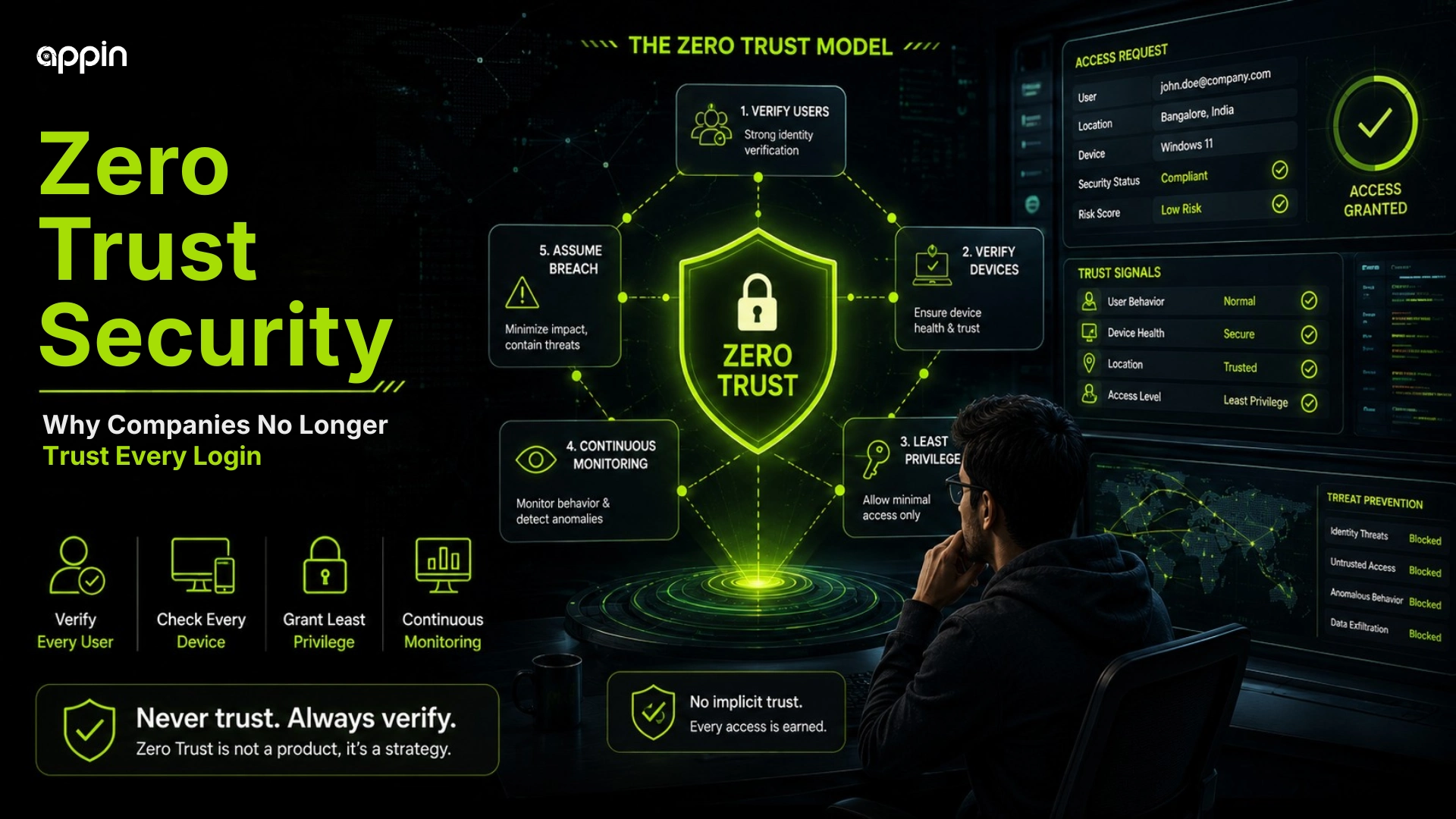
Zero Trust Security Explained for Beginners: Why Every Access Request Must Be Verified.
Zero Trust security explained simply means companies no longer trust a login just because the password is correct.
Earlier, many companies trusted users once they logged in from an office network or VPN. But now, passwords can be stolen, devices can be infected, sessions can be misused, and attackers can appear like real employees.
This blog explains how Zero Trust works, why companies verify every user and device, and what cybersecurity students should learn from this modern security model.
What is Zero Trust security?
Zero Trust security is a cybersecurity model where no user, device, app, or login is trusted automatically, even if it comes from inside the company network.
The core idea is simple: never trust automatically, always verify. A login is not treated as safe only because it came from a known location or company laptop.
Zero Trust cybersecurity model protects:
- Users
- Devices
- Applications
- Cloud tools
- Business data
- Internal systems
- Remote access
Traditional security often trusted people inside the network. Zero Trust checks every access request based on identity, device, location, behavior, and risk.
Why do companies no longer trust every login?
Companies no longer trust every login because attackers can steal passwords, compromise devices, and appear like real users.
A password alone is not enough proof anymore. If a student, employee, or manager enters credentials on a fake login page, attackers may use those details later.
Companies worry about:
- Stolen passwords
- Phishing attacks
- Infected devices
- Remote work risks
- Cloud app access
- Insider threats
- Session misuse
- MFA fatigue attacks
Zero trust matters because attackers can abuse valid logins, especially when users are tricked into approving access. MFA fatigue attack
How does Zero Trust security work?
Zero Trust security works by continuously checking identity, device health, location, behavior, access level, and risk before allowing or continuing access.
This means access is not a one time decision. A user may be allowed to open email but blocked from downloading sensitive finance files from an unknown device.
Zero Trust checks may include:
- User identity
- Device trust
- MFA status
- Login location
- Normal or unusual behavior
- Role based access
- App sensitivity
- Session risk
Access can be allowed, limited, challenged, or blocked.
What are the core principles of Zero Trust security?
The core principles of Zero Trust security are verify explicitly, use least privilege access, and assume breach.
These principles help companies reduce damage even when one account or device is compromised.
The main principles are:
- Verify explicitly
- Use least privilege access
- Assume breach
- Monitor continuously
- Segment access
- Protect data, not only networks
- Make decisions based on risk
Zero Trust is not one tool. It is a security strategy.
What does “verify explicitly” mean in Zero Trust?
Verify explicitly means every access request is checked using multiple signals before trust is given.
A company may ask: who is logging in, which device is being used, where is the login coming from, and is the behavior normal?
Verification may include:
- Username and password
- MFA
- Device health
- Location
- Session behavior
- App sensitivity
- Risk score
One password is not enough because passwords can be stolen.
What does “least privilege access” mean?
Least privilege access means users get only the access they need to do their job, not unlimited access to all systems.
For example, a finance employee may need invoice access but not server admin access. A marketing employee may need social media tools but not payroll records.
Least privilege helps with:
- Role based access
- Department wise access
- Temporary access
- Admin access control
- Lower damage after compromise
- Better audit visibility
If attackers compromise one account, limited access reduces what they can reach.
What does “assume breach” mean in cybersecurity?
Assume breach means companies behave as if an attacker may already be inside the network, so every action is monitored and limited carefully.
This does not mean companies are always hacked. It means they prepare for the possibility instead of trusting everything inside the network.
Assume breach helps companies:
- Monitor internal movement
- Detect suspicious activity
- Reduce lateral movement
- Limit sensitive access
- Respond faster
- Protect critical data
Strong access control also helps reduce ransomware movement inside a company network. ransomware in 2026
How does continuous verification reduce cyber risk?
Continuous verification reduces cyber risk by checking users and devices not only at login, but throughout the session.
A login may start safely but become risky later. For example, a session may suddenly show a new location, unusual download volume, or access to files the user never opens.
Continuous verification can help by:
- Rechecking risky behavior
- Detecting location changes
- Blocking suspicious device activity
- Limiting access after risk increases
- Monitoring sessions
- Applying adaptive authentication
The goal is to catch unusual behavior early.
How does Zero Trust protect against phishing attacks?
Zero Trust helps reduce phishing impact by making stolen passwords less useful without device trust, MFA, behavior checks, and access control.
If attackers steal a password, they still may not pass device checks, MFA, location checks, or risk rules.
Zero Trust can reduce phishing impact through:
- MFA
- Device verification
- Suspicious login detection
- Limited permissions
- Risk based access
- Faster account response
It does not remove the need for awareness, but it reduces the damage from one mistake.
How does Zero Trust protect remote workers and cloud apps?
Zero Trust helps organizations manage access risks for remote workers. and cloud apps by verifying every access request instead of trusting a user only because they are on a company network.
Remote work changed security. Employees may use laptops, phones, home WiFi, cloud dashboards, and SaaS platforms from different locations.
Zero Trust helps protect:
- Work from home access
- SaaS tools
- Cloud dashboards
- Personal or unmanaged devices
- Partner access
- Remote teams
- Conditional access
This is important for modern companies in India where teams may work from offices, homes, client locations, and coworking spaces.
How does Zero Trust help stop lateral movement?
Zero Trust helps stop lateral movement by limiting what attackers can access after compromising one account or device.
Lateral movement means attackers move from one system to another inside a company. Zero Trust reduces this by limiting access between systems.
It helps through:
- Network segmentation
- App level access control
- Least privilege permissions
- Continuous monitoring
- Device checks
- Strong identity rules
- Smaller blast radius
One compromised account should not expose everything.
What tools and technologies support Zero Trust security?
Zero Trust security is supported by identity tools, MFA, endpoint security, access control, SIEM, cloud security, and network segmentation.
Tools help enforce the strategy, but buying a tool alone is not enough.
Common support areas include:
- Identity and access management
- Multi factor authentication
- Endpoint detection and response
- Conditional access
- SIEM monitoring
- Data loss prevention
- Network segmentation
- Cloud security tools
The important part is how these tools work together.
How does cybersecurity make Zero Trust effective?
Cybersecurity makes Zero Trust effective by combining access control, monitoring, threat detection, device security, data protection, and incident response.
Zero Trust needs cybersecurity thinking, not only policy language. Security teams must know what to protect, who needs access, and what behavior looks risky.
Cybersecurity supports Zero Trust through:
- Identity protection
- Threat monitoring
- Vulnerability management
- Secure configuration
- Log analysis
- Incident response
- Security awareness
- Policy enforcement
APIs also need zero trust thinking because not every system to system request should be automatically trusted. API security explained
What mistakes do companies make while implementing Zero Trust?
Companies make mistakes when they treat Zero Trust as only a tool purchase instead of a security strategy.
Zero Trust implementation mistakes often happen because organizations start with products before mapping users, devices, apps, and data.
Common mistakes include:
- Buying tools without planning
- Not mapping users and assets
- Giving too much access
- Ignoring device security
- Weak MFA rollout
- Poor monitoring
- No employee awareness
- No phased implementation
The better approach is to start small, protect critical systems first, and improve step by step.
What can cybersecurity students learn from Zero Trust security?
Cybersecurity students can learn how modern companies protect identity, devices, cloud apps, networks, and sensitive data using continuous verification.
Zero Trust for beginners is useful because it connects many cybersecurity topics in one model.
Students can learn:
- Identity security
- Access control
- Cloud security basics
- SOC monitoring
- Endpoint security
- Network segmentation
- Incident response
- Risk based security thinking
One goal of zero trust is to reduce the chance of attackers quietly moving or stealing sensitive data. data exfiltration explained
How can Appin help students learn Zero Trust and modern cybersecurity?
Appin helps students learn modern cybersecurity through practical training, ethical hacking concepts, network security, access control awareness, SOC basics, and hands on labs.
At Appin Indore, students can learn cybersecurity fundamentals, ethical hacking foundation, network attacks and defense, identity and access security awareness, SOC concepts, and incident response basics.
Students can explore CEH v13, CHFI, Bug Bounty Diploma, Diploma in Information Security, and the 6 month Diploma in IT Security and Ethical Hacking.
Appin Technology Lab also provides mentor led learning, career guidance, and placement assistance for students and freshers.
Why Zero Trust Is Becoming a Core Cybersecurity Skill ?
Zero Trust security explained in one line means companies verify every access request instead of trusting users, devices, or networks automatically.
Modern attackers can use stolen credentials, phishing, malware, and remote access to appear like real users. Zero Trust reduces risk by continuously checking identity, device health, location, behavior, and permissions.
Start your cybersecurity journey with Appin Indore and build practical skills in ethical hacking, network security, identity protection, SOC basics, and modern access control through guided labs and expert support.
